Your week of posts, written before you need them.
WiderStage reads your projects and the way you already write, drafts the next seven days of posts for X, and types each one into the compose window when its time comes. You read it, you change what you want, and you press Post.
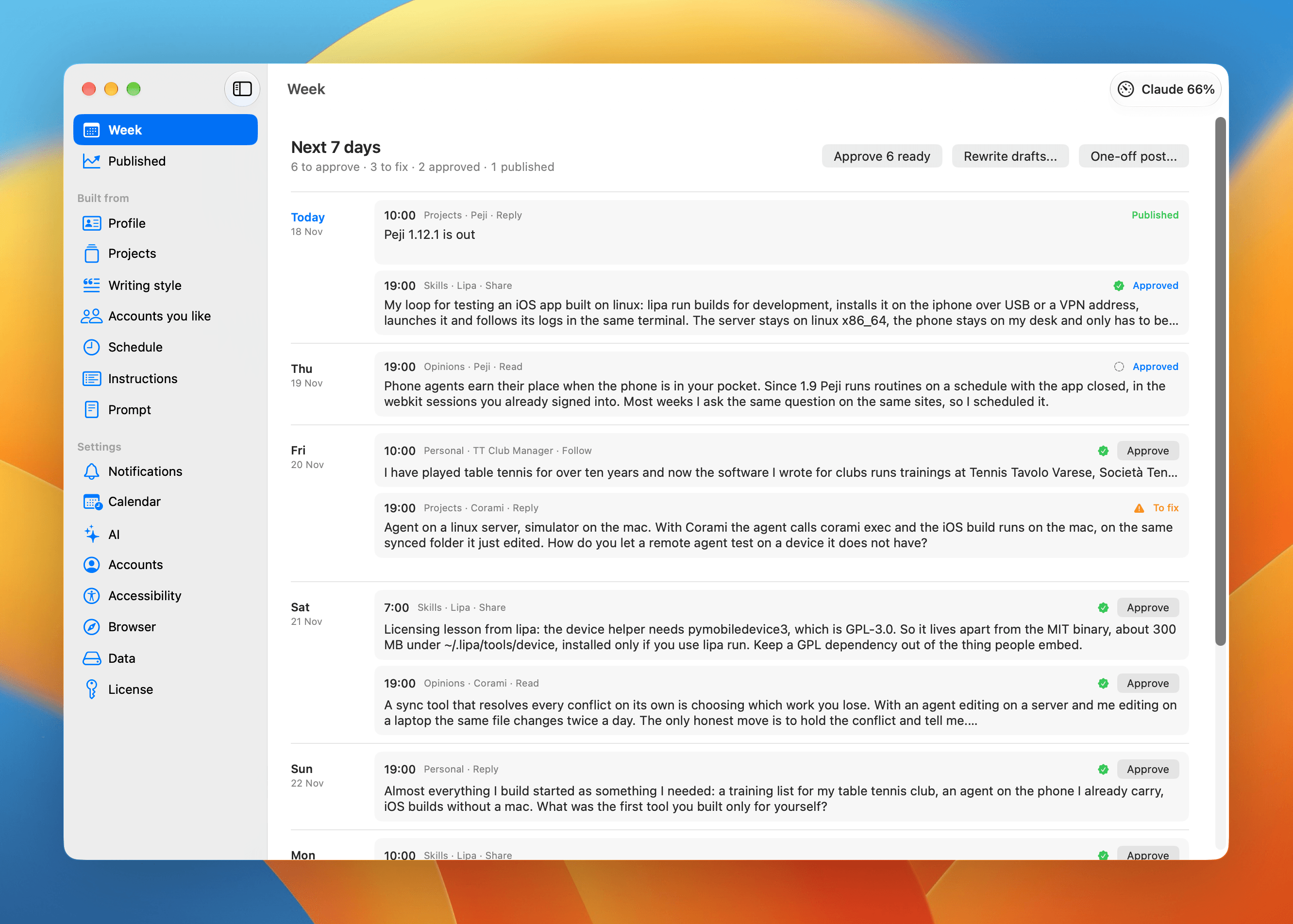
What a week looks like
You press Write week
One request, seven days of drafts. Each post says which project it comes from and which kind it is: a project, a lesson, an opinion, something personal.
You read seven drafts
Approve, rewrite with a note, or skip. Every draft passes a check for the phrases that make writing sound generated before it reaches you.
WiderStage writes, you post
At the time you set, a notification opens the compose window and the text arrives typed, images attached, as if you were writing it. The cursor sits in the text and nothing has been sent.
It sounds like you because it learns from you
WiderStage reads your own posts from your profile and your replies, and turns them into rules it can check: sentence length, openings you use, words you never use. Rules and examples stay visible and editable on the Writing style screen.
No X developer account
WiderStage works inside its own browser, signed in to your X account. It reads your posts, their numbers and your account status, then types each post into the compose window. No API keys, no developer app, no fee per post.
- Your own posts and replies, read to learn how you write.
- The numbers on a published post at 2 hours, 48 hours and 7 days.
- Your account status, so a post that lost its reach is not a surprise.
- The compose window, filled one character at a time. You press Post.
What it does not do
- It never presses Post, follows, or replies for you.
- It does not invent facts about your projects. The facts come from the pages you point it at.
- It does not keep your writing on a server of ours. There is no server.
- It does not run on Windows or Linux.
Where your writing lives
Your profile, projects, drafts and published posts are JSON files in your own Application Support folder, and the API key, if you use one, is in the macOS Keychain. The only traffic is to X, which the app opens in a web view, and to the model you chose: Claude Code on the plan you already pay for, or any OpenAI compatible API key.
Settings can back the whole library up to iCloud Drive and restore it, and approved posts can appear in a WiderStage calendar, so you see what is coming from your iPhone too.
Requirements
- macOS 15 or later on Apple silicon or Intel
- An X account you are signed in to
- Claude Code already signed in, or any OpenAI compatible API key
Price
One licence, one Mac, updates included. You can move the licence to a new Mac from Settings, License, without asking us.
The download is the full app. Without a licence it opens to a screen that asks for one.
Questions
- Which models can it use?
- Claude Code, if it is already installed and signed in on your Mac, or any OpenAI compatible API: OpenAI, OpenRouter, the Anthropic compatible endpoint, a local model in Ollama or LM Studio.
- Do I need an API key?
- Only for the API route. With Claude Code, the requests use the plan you already have.
- Do I need an X developer account?
- No. WiderStage signs in to X in its own browser, the way you would, and reads and writes there instead of using the X API.
- What happens without a connection?
- The app works. It checks the licence at launch and every few hours, and stays unlocked for seven days from the last check.
- Can I move it to another Mac?
- Yes. Deactivate it in Settings, License on the old Mac, then paste the same key on the new one.
- How do updates arrive?
- From inside the app. Each update is signed and notarized by Apple, and WiderStage asks before installing one.
- Refunds?
- See refunds. A refund deactivates the licence, and the app locks at the next check.
What is still rough
- The AI runs on your plan or your key, so a long request costs what your provider charges
- Reading your own posts the first time takes a few minutes
- Only X for now, one post at a time, no threads.